Give students access to AI APIs with LLMduckt
General information and access for teachers
General information and things to consider
- With LLMduckt, you can provide your students with API keys for various AI models (external site) (the link only works if you log in to LLMduckt via SSO), for example as part of programming courses. Students can then use these API keys to interact with and integrate an AI into their programme code.
- Students and teachers each have 1,000 prompts per month per LLMduckt course at their disposal. This limit cannot currently be increased by teachers, as some of the underlying models are subject to a fee.
- LLMduckt is connected to the TeachCenter via LTI. This means that students can access the LLMduckt activity directly via the TeachCenter course and create and retrieve API keys.
- When logging into LLMduckt for the first time, you and your students must agree to the terms of use.
- If you want to try out LLMduckt before your students are using it, TeachCenter Support will be happy to set up a hidden activity in your TC course, to which only you or a defined group of people will have access.
- The LLMduckt user interface is only available in English. However, the language models you can select are available in many languages.
- Do you have your own AI infrastructure and want to connect it to LLMduckt in order to give your students API keys for your own model? If so, please contact the FLAAIT team to discuss its configuration. You can set the prompt limits for your own AI infrastructure yourself.
How to activate LLMduckt in a TeachCenter course
- Select one or more suitable AI models from the overview (external site) .
- Contact TeachCenter Support to request access to LLMduckt. Please specify the relevant TeachCenter course and the selected AI models. Note: If you currently do not have a TeachCenter course for your course, TC Support will be happy to create one for you.
- TeachCenter Support will set up a connection to LLMduckt in your TC course and activate the selected model(s).

- Access rights in LLMduckt are synchronised with the TeachCenter course. Anyone enrolled in the TeachCenter course can retrieve an API key. Anyone enrolled as a teacher or tutor can also view statistics and manage access rights.
- If other people need access to LLMduckt, please add them to your TeachCenter course and assign them the appropriate role there.
How to view statistics and revoke APIs
The Usage menu in LLMduckt shows you the number of prompts sent by each user. This allows you to check, at a basic level, which students have already used LLMduckt, and how frequently. However, you cannot view the content of the submitted prompts, as students only generate an API key in LLMduckt; content is not stored, and processing takes place on a secured infrastructure. Only the date, the number and the approximate size of the prompt are stored.

TeachCenter Support can also shut down the course in LLMduckt entirely if it is no longer required. Please note that this will result in the loss of all statistics.
Information for students
Guide for students
If you are required to use an API key for an LLM in a course, teachers can provide you with this key via LLMduckt directly within the TeachCenter.
- Click on the link with the LLMduckt logo in the TeachCenter course. You will be redirected to the LLMduckt page directly within the TeachCenter and assigned to the correct LLMduckt course.
- Please agree to the user terms.
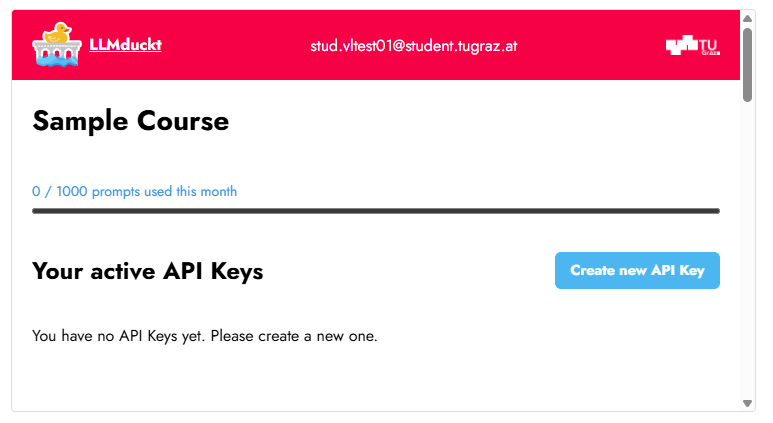
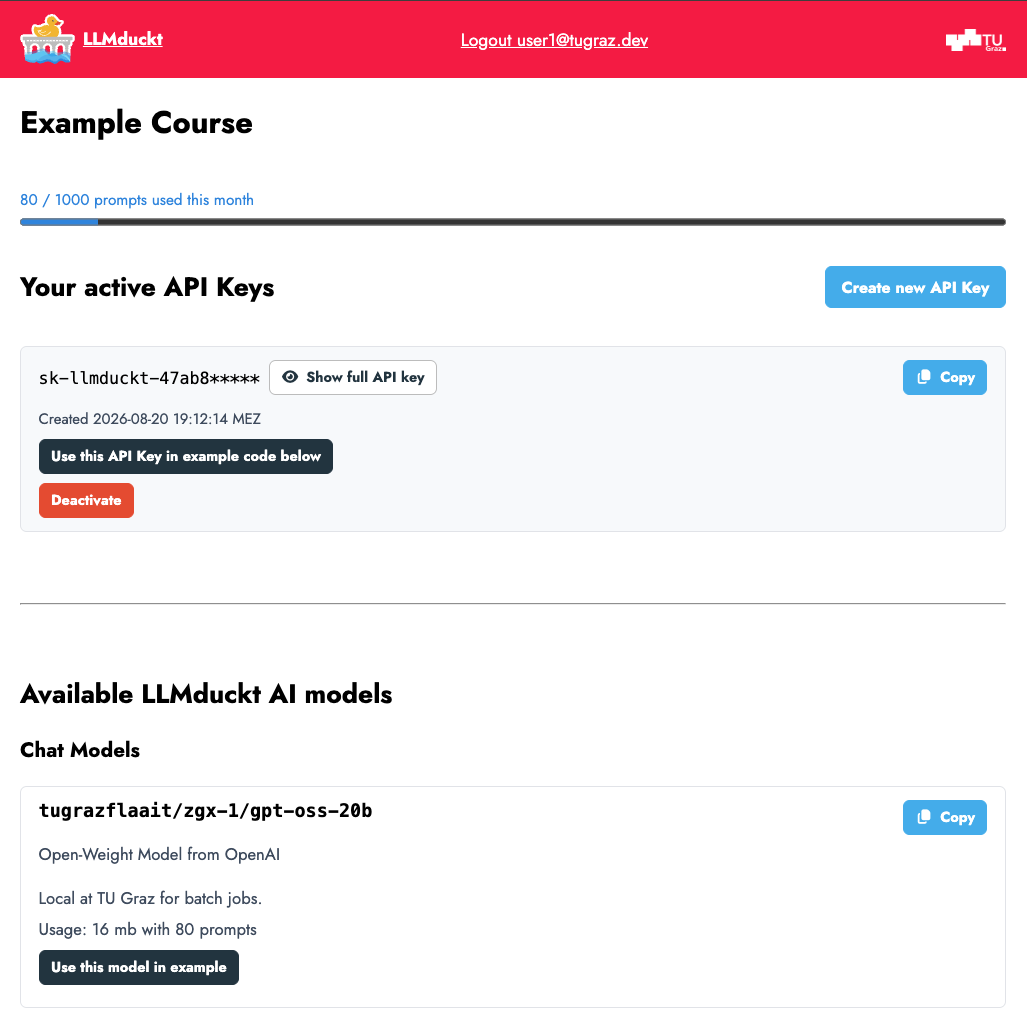
- Click on the Create new API key button to generate an API key.
- You can also rename your API key by clicking on the tag icon.

- Below you can find sample code in various programming languages. API keys and models can be pre-filled into the sample code, which you can then copy and use in your programme. Links to further information about the API are provided.

- On this page, you can also see at any time the number of prompts you have already used. The number of available prompts is reset on the first of every month.
Help & contact
Frequently asked questions are answered in the LLMduckt FAQ (external site) .
For questions on TeachCenter: tc@tugraz.at
For technical questions on how LLMduckt works: flaait.llt@tugraz.at
- Published
- Updated